Container Security: A Practical Guide Across Lifecycle
Updated: Sep 17
What is a container?
A container is a single, ready-to-run package of software. It holds an application and all the files, libraries, and settings it needs to work. Because everything is packed into this one box, the application runs exactly the same way on a developer's laptop as it does on a live production server.
Containers package an application with its libraries so the same binary can run on a laptop and in production. Docker and Kubernetes made that model default. They did not make it safe, per say!
In a typical deplyoment, the kernel is shared. A vulnerable package in the image, a --privileged flag, a secret baked into a layer, or an unmonitored docker exec can all become a host problem.
NIST SP 800-190 treats image, registry, orchestrator, container and host OS as one system. This post follows that split with three checks you can run locally: scan the image, drop Linux capabilities, then watch the runtime.
What container security means
Container security is the set of controls defined around the image, the registry that ships it, the runtime that starts it, and the host kernel it shares. In container deplyoments, unlike a VM, there is no separate guest OS to contain a kernel exploit. Isolation is namespaces, cgroups, seccomp, and whatever you did not grant.
MITRE ATT&CK framework maps the attacker side as T1610 Deploy Container (stand up a workload you did not intend) and T1611 Escape to Host (leave the namespace) to this. While, the secrets in image layers fall under T1552.001 Unsecured Credentials: Credentials In Files.
Architecture: four places to fail
A typical path to deployment is: source code build, testing, push, pull, run. Because different teams often own different segments of this pipeline, each hop introduces unique security risks and potential failure points.
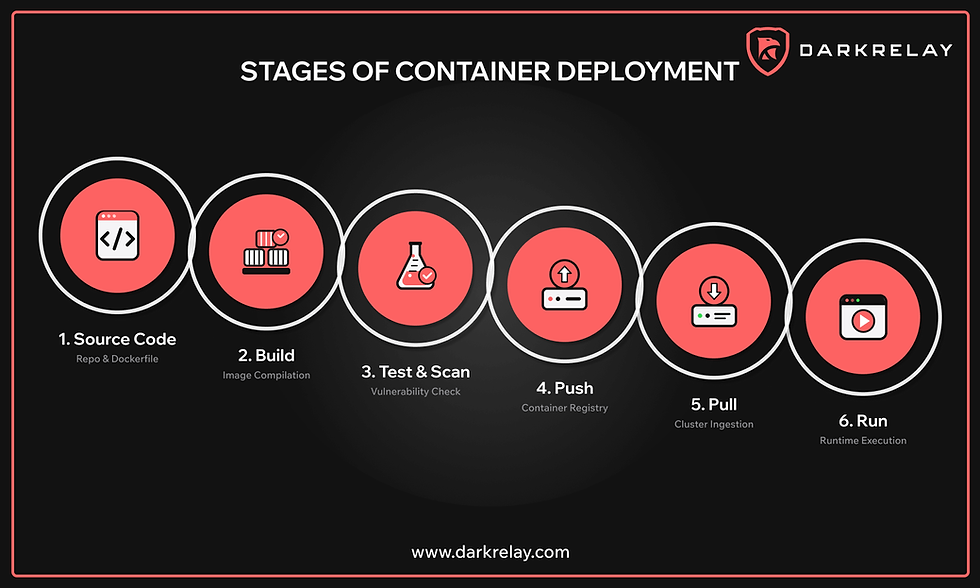
A container image bundles your application with its required OS packages. This means a single high-severity vulnerability (CVE) in your base image will be multiplied across every scheduled replica in your cluster. Furthermore, the registries that store and distribute these images represent a critical supply chain link. An attacker with unauthorized push access—or the ability to intercept unencrypted traffic (MITM) to a registry—can silently swap legitimate images with malicious payloads before production ever pulls them.
Finally, the container runtime (such as Docker Engine, containerd, or CRI-O) is responsible for creating namespaces and enforcing security profiles. It is vital to recognize that a default docker run command does not provide a hardened security boundary. Beneath the runtime, the host operating system supplies the shared kernel. If that underlying host remains unpatched, or if a container is recklessly bind-mounted to the root directory (/), no amount of pre-deployment image scanning will protect your environment from a compromise.
Below, we discuss principles to keep in mind for ensuring the security of our containers in production.
Scan images before they ship
Default tags such as nginx:latest look convenient but they age badly. OS packages in the base layer can pick up CVEs faster than application owners notice. Scan the image in pipeline, fail the build on CRITICAL/HIGH issue with a fix available, and pin digests so yesterday's scan still matches what you deploy.
Below is a practical example we are working with to demonstrate this (nginx:latest):
sudo trivy image --scanners vuln --pkg-types os --format table nginx:latest | head -n 20Current Trivy flag is --pkg-types os. Figure 1 below was captured with the older --vuln-type os alias, which still works and prints a deprecation warning.
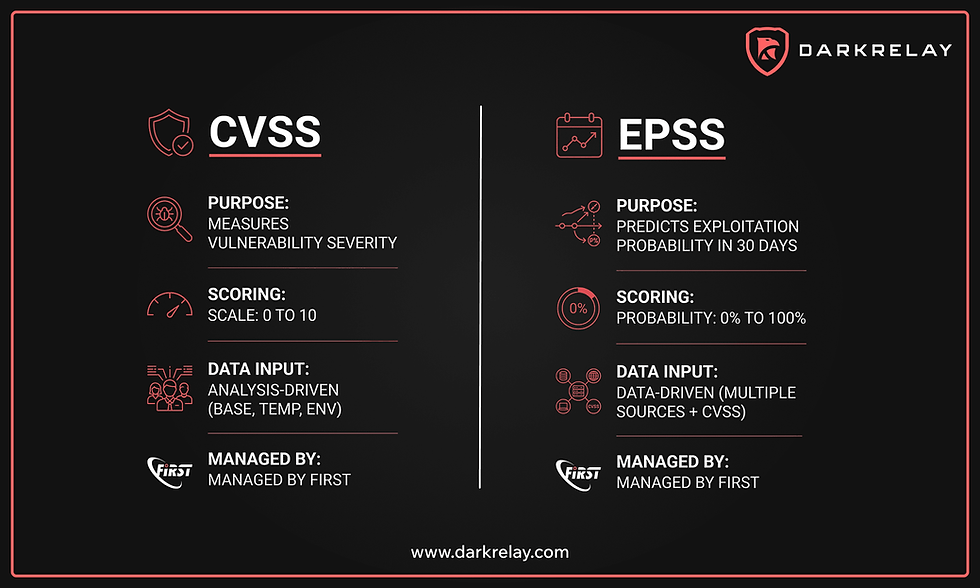
On this nginx:latest (Debian 13.6) the OS scan reported 331 findings: 5 Critical, 53 High, 117 Medium, 120 Low, 36 Unknown. That is a stock public tag, not a custom app image. If your production policy is "no CRITICAL on OS packages," this image does not pass.
Further, use a smaller base (distroless, alpine where it fits, or a distro image you actually patch). Rebuild on a schedule. Do not treat "we scanned it once at first push" as a control. For more details on how this sits in a build pipeline, see our introduction to DevSecOps.
Drop Linux capabilities at runtime
A process inside a container is still a Linux process. Default Docker capability sets include enough to be interesting after a code-exec finding: CAP_NET_RAW, CAP_DAC_OVERRIDE, and others depending on engine version. --privileged is worse. It disables most of the isolation people think they bought.
Compare the capability masks on PID 1 with and without --cap-drop=ALL:
sudo docker run --rm nginx:latest sh -c 'grep Cap /proc/1/status'
sudo docker run --rm --cap-drop=ALL nginx:latest sh -c 'grep Cap /proc/1/status'
Figure 2 (below) is that comparison. Default CapPrm / CapEff / CapBnd sit at 00000000a80425fb. After --cap-drop=ALL every field is zeros. Nginx serving static files does not need the default set. Add back only what the binary requires (CAP_NET_BIND_SERVICE if it listens on 80 as non-root, for example).
Also run as a non-root user in the image (USER in the Dockerfile). Dropping capabilities while still UID 0 is incomplete. The CIS Docker Benchmark is the checklist for engine and daemon flags; we should avoid inventing a private standard when CIS already scored the same knobs.
Container escape is a host problem
Escape happens when a container process reaches host files, devices, or other tenants. Common paths: kernel/runtime CVEs, --privileged, CAP_SYS_ADMIN, Docker socket mounted in, or a writable hostPath in Kubernetes. Scanning the app image does not detect a socket mount in the pod spec.
Mitigations that actually change the outcome:
patch the host and runtime,
never give "--privileged" in production,
drop capabilities as in Figure 2,
enable seccomp (Docker's default profile is a start; Kubernetes often needs it set explicitly), AppArmor or SELinux on the host,
and no bind-mounts of /, /var/run/docker.sock, or the host's /proc.
If a workload needs the Docker socket, it is an admin tool, not an app container.
Secrets and network reach
Never use ENV AWS_SECRET_ACCESS_KEY= inside a Dockerfile directly. Image layers are immutable and permanent. Anyone with permission to docker pull, inspect image history (docker history), or export the image tarball can easily extract baked-in credentials. Instead, scan images for high-entropy strings before push, and enforce runtime injection. Better yet, eliminate static credentials altogether: use workload identity federation (such as AWS IRSA or GCP Workload Identity) so containers assume IAM roles directly, or retrieve credentials on demand from services like AWS Secrets Manager and HashiCorp Vault via short-lived tokens, sidecars, or the Secrets Store CSI driver backed by KMS.
We apply the same defense-in-depth approach to network implementation. Default bridge setups and flat cluster CIDRs permit a compromised pod to move laterally across every adjacent namespace. Enforce segmentation with granular NetworkPolicies: deny all egress by default except to explicitly allowed destinations, and never expose administrative or debugging ports. Crucially, a container capable of reaching the instance metadata service (IMDS) or the internal cluster API server is an identity compromise in progress, not merely a network hygiene footnote.
Watch the runtime, not only the CVE feed
Trivy only tells you what packages were shipped. It gives us no information if someone spawned `sh` on a workload that never has an interactive shell!!!
Runtime sensors sit on syscalls (eg: Falco, other eBPF/audit agents) and fire on process, file, and network shapes you define.
sudo falco
sudo docker exec -it falco-test2 sh
Figure 3 (above) is Falco 0.44.1 running on a Kali host, modern BPF probe, watching falco-test2 (alpine) image. After docker exec -it falco-test2 sh and id (UID 0), Falco logs: Notice A shell was spawned in a container with an attached terminal, with process=sh, container_name=falco-test2. That is the detection you want on app nodes: i.e. interactive shells, unexpected package managers, writes under /bin, outbound to new destinations.
Remember to tune rules before you page people tough! Falco's default set is noisy on build agents. Scope production rules to images that should never exec a shell, and keep an allowlist for debug DaemonSets you actually operate.
Put the scan in CI/CD
Order of operations: code, build image, scan, sign or verify, push, deploy. (refer our first section here) Fail the job when Trivy (or the scanner you standardized) hits your severity gate. Block unsigned or unverified images at admission. Scanning only in a weekly spreadsheet is how nginx:latest reaches prod.
A minimal gate might look like :
pin the base digest,
trivy image --exit-code 1 --severity CRITICAL,HIGH, and
refuse --privileged in the Kubernetes PSA or admission policy.
Image scan without runtime policy still leaves Figure 2 and Figure 3 as production work.
When something fires
Isolate first. Do not docker rm -f until you have image ID, digest, mounts, capability set, and runtime events. Collect container logs, Falco (or equivalent) hits, host audit, and netflow.

Rotate any credential that lived in the image or in the environment of the affected task. Replace the image; do not "apt-get upgrade" inside a running container and call it remediation.
Afterward, add the missing control: digest pin, cap-drop, NetworkPolicy, or a Falco rule that would have caught the same exec. Incidents that only produce a ticket and no control change will recur on the next tag.
Conclusion
Container security is image contents, who can push them, what the runtime grants, and what the kernel will still allow. Figure 1 is why you scan. Figure 2 is why defaults are not least privilege. Figure 3 is why a clean CVE report is not a detection program.
Treat image layers as untrusted until scanned. Treat the process as untrusted until capabilities and user are constrained. Treat the running workload as hostile until the syscall policy says otherwise. The idea that "the container is the sandbox" fails the moment the sandbox has the Docker socket or CAP_SYS_ADMIN.
References
Register for instructor-led online courses today! https://www.darkrelay.com/courses
Check out our self-paced learning paths! https://www.darkrelay.com/learning-paths
Explore our bundled Pricing & Plans for cost-effective options! Buy a course subscription to learn more—hands-on labs and expert-led training included. https://www.darkrelay.com/plans-pricing
Contact us for custom pentesting needs at: info@darkrelay.com or WhatsApp.


Comments